The Hidden Problem with Your Default Homepage.
A few months ago, a freelance designer shared something interesting. He said he spends nearly 8 10 hours a day inside his browser. Yet every time he opened a new tab, he was greeted by a blank screen and a basic search bar.
It seems harmless.
But multiply that by 50+ tabs per day, and suddenly that empty space becomes wasted productivity.
Your browser is no longer just a tool, it’s your digital office. And your internet homepage is the front door of that office.
So why does it look empty?
The truth is, most people underestimate how much impact a smart homepage can have. If designed properly, it can function as a complete productivity dashboard, giving you instant access to tools, tasks, search engines, and focus-enhancing features. With tools like the new tab extension, your default browser tab can instantly transform into a structured workspace built to support efficiency and clarity throughout your day.
Let’s explore how you can make that transformation.
Why Your Internet Homepage Should Work for You.
- Think about your daily online routine:
- You search on Google
- Watch tutorials on YouTube
- Check the weather
- Open bookmarked websites
- Use task managers
- Set timers
Each of these actions requires extra clicks and extra tabs
.
A well designed homepage reduces this friction.
Instead of jumping between platforms, your internet homepage becomes a centralized workspace. It brings structure to chaos and eliminates small distractions that quietly steal time.
When your homepage becomes a productivity dashboard, you:
- Save time on repetitive actions
- Stay organized
- Reduce browser clutter
- Improve focus
- Start every session with clarity
This shift may feel small but daily improvements create massive long term results.
What Makes a Powerful Productivity Dashboard?
Not every homepage customization tool is effective. A true productivity dashboard should offer:
Multi Search Capability
The ability to search across multiple platforms without switching tabs.
Smart Widgets
Clocks, timers, to do lists, notes, and weather all in one place.
Visual Bookmarks
Clean, organized access to your favorite websites.
Customization
Your workflow is unique. Your homepage should be too.
Minimal Design
Too many elements create distraction. Clean design improves clarity.
One solution that combines all these features is CentPage.
How CentPage Transforms Your Browser Experience.
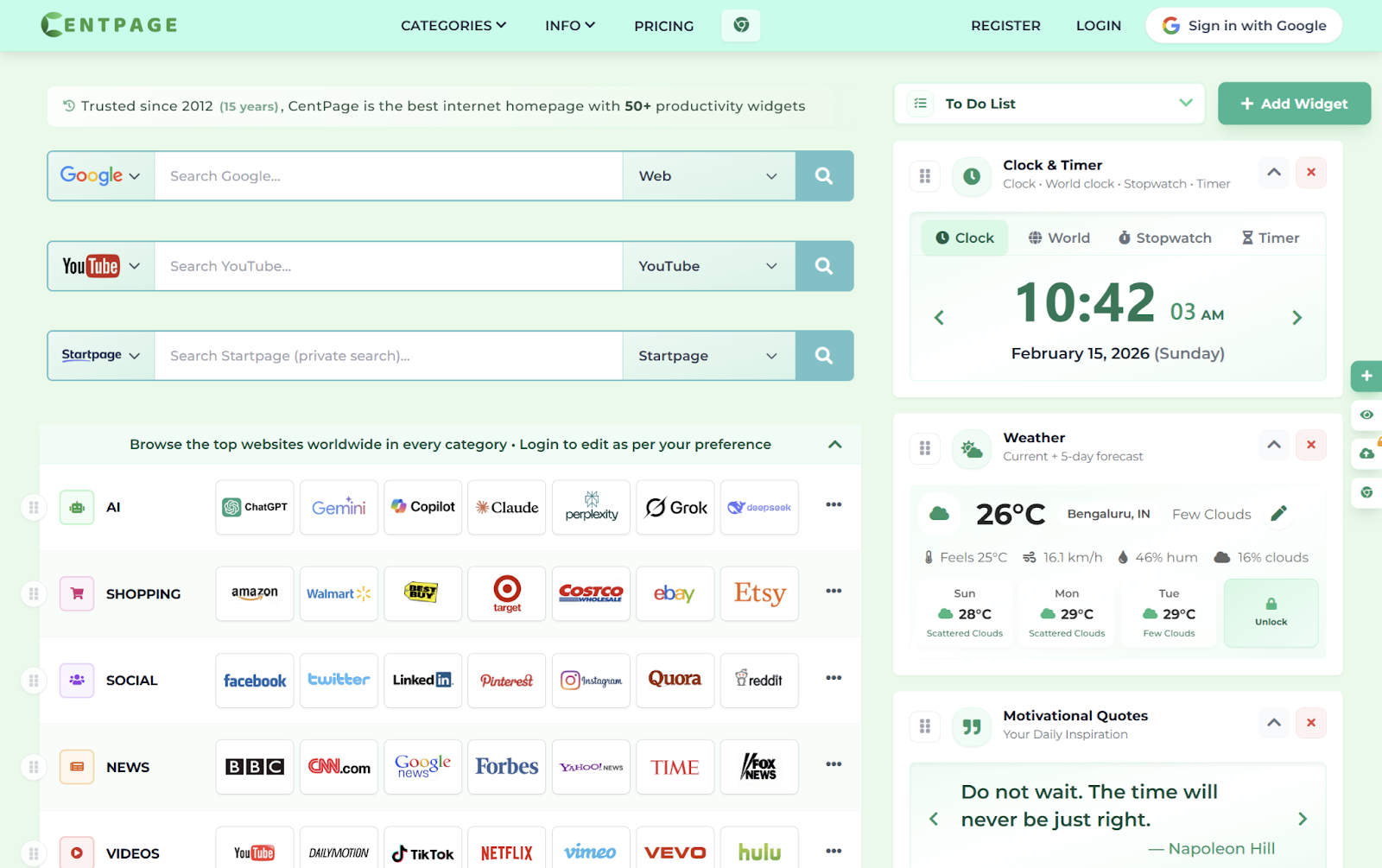
Unlike a standard new tab Page, CentPage website provides a fully customizable homepage environment designed for productivity.
Instead of opening a blank screen, you can access:
- Multiple search engines (Google, YouTube, privacy search options)
- Categorized website shortcuts
- 50+ widgets
- Drag and drop organization
- Clean, minimal interface
You can explore the platform directly through the CentPage official website to see how it turns an ordinary tab into an efficient workspace.
But the real transformation happens inside your browser.
By installing the CentPage Chrome extension, every new tab automatically becomes your personalized dashboard.
No extra apps.
No complicated setup.
Just a smarter start page.
Real Recognition and Community Feedback.
When evaluating tools, social proof matters.
CentPage has been featured on CentPage on Product Hunt, where early adopters highlight its clean interface and workflow benefits. The community feedback emphasizes how replacing a default tab with a structured dashboard improves daily productivity.
Beyond that, the brand actively shares updates and insights through their official social presence. You can follow the latest announcements and feature updates on CentPage Twitter to stay informed about improvements and new capabilities.
This growing ecosystem shows that the tool isn’t just functional it’s evolving with user needs.
A Simple 3 Step Plan to Upgrade Your Homepage.
If you want to transform your browsing experience today, follow this simple plan:
Install a Smart New Tab Tool
Start by installing the CentPage productivity Chrome extension. This replaces your default tab instantly.
Customize Your Dashboard
- Add widgets that match your workflow:
- To do list for task tracking
- Timer for deep work sessions
- Weather for daily planning
- Visual bookmarks for quick access
Organize Your Digital Workspace
Group similar websites into categories. Remove clutter. Keep only what supports your productivity.
Within minutes, your internet homepage becomes a true productivity dashboard.
The Long Term Impact of a Smarter Homepage.
Many people think productivity requires major lifestyle changes.
But sometimes, improvement starts with something small like what you see when you open a new tab.
Imagine opening your browser tomorrow morning and instead of distractions, you see:
- Your top priorities
- Quick search tools
- A focused layout
- Everything organized
That mental clarity sets the tone for your entire day.
If you want a deeper look at how the system works in action, you can watch a detailed walkthrough on the CentPage YouTube overview, which demonstrates how the dashboard transforms everyday browsing.
Small upgrades.
Big difference.
Final Thoughts.
Your browser is where ideas are researched, projects are managed, and goals are executed.
Leaving your internet homepage blank is like leaving your office desk messy.
By turning your homepage into a structured productivity dashboard, you create a digital environment that supports focus instead of distraction.
With tools like CentPage, that transformation takes only a few minutes but the productivity benefits compound over time.
Every new tab is an opportunity.
Watch the official CentPage promo video
About the Author